How to Make a Small Business Profile Feel Trustworthy
Your visitors decide if they trust a small business in seconds—before they ever scroll. The good news: most of what builds trust is simple, visible, and under your control.
When someone lands on a business profile page, they usually ask: “Can I reach them?”, “Are these hours/address real?”, “What do they actually do?”, and “Do they seem like the kind of place I can count on?”
Research and editorial guidance repeatedly point back to the same principle: people look for reliable signals, clear information, and transparency—not vague promises. For example, Google’s content guidance emphasizes helpful, reliable, people-first pages, and the Associated Press outlines standards for accuracy and trust in how information is presented. See Google Search essentials and AP News values and principles.
In this guide, you’ll learn practical trust signals you can add to a small business profile—using clear contact details, real photos, readable hours, and a few relevant policies—plus a quick checklist to finish before publishing.
Table of contents
- The trust signals visitors notice first
- Why real photos matter more than stock-heavy pages
- How to present hours, address, and contact options clearly
- Adding policies, certifications, or service notes when relevant
- Keeping tone professional and friendly
- A final trust checklist before publishing
The trust signals visitors notice first
Trust is rarely built by one dramatic line. It’s built by repeated evidence that the business is real, reachable, and consistent. Before readers commit, they scan for a few high-signal elements—often in this order:
- Reliable contact information (a real phone/email and a clear way to get a response)
- Clear location and hours (so they can plan, not guess)
- A specific description of services (so they can quickly confirm fit)
- Proof the business is current (recent photos, updated details, and current policies)
Useful takeaway: If a visitor can’t answer “How do I reach you, and when are you available?” within a quick scan, trust drops—even if your services are excellent.
Why real photos matter more than stock-heavy pages
Stock photos can look polished, but they often fail the “is this us?” test. Real photos answer an unspoken question: “Do they operate somewhere, with people who show up?”
When you choose images, aim for photos that match the exact experience a customer expects. Good options include:
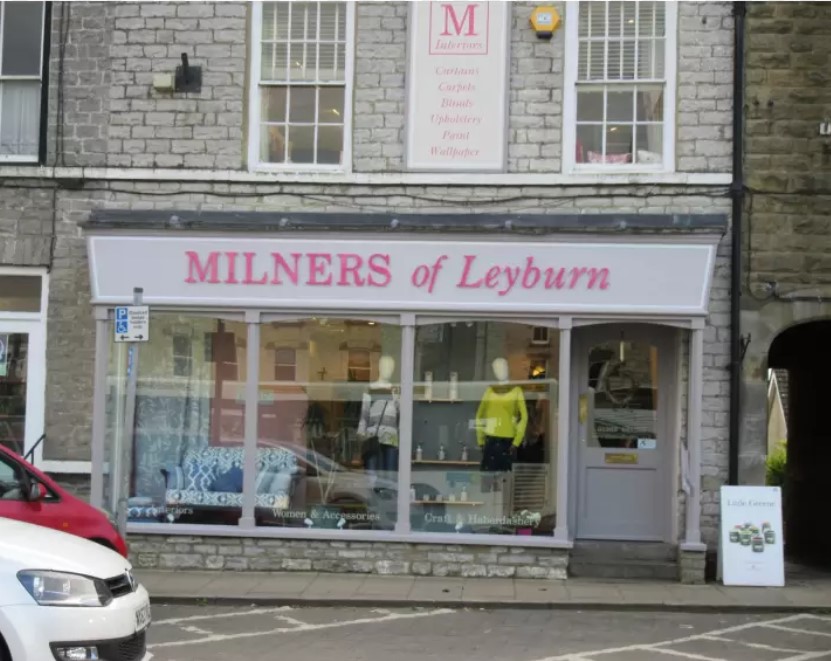
- Exterior storefront or building signs (for walk-ins and local confidence)
- Interior spaces where services happen
- Team photos (optional, but humanizing)
- In-progress work or finished results (when appropriate)
- Screenshots of your business profile or booking flow (only if it’s clearly your real process)
Small practical rule: Use fewer photos, but make them more specific. One believable, relevant image usually builds more trust than a gallery of generic ones.
How to present hours, address, and contact options clearly
Hours, address, and contact details should be easy to find and easy to use. If a visitor has to hunt for them, they assume the information might be out of date.
Hours: show the normal pattern and explain exceptions
Write hours in a readable format. If your business has seasonal hours, holidays, or appointment-only days, add a short note like: “Appointments available by request on Mondays” (only if true).
Address: clarity beats perfection
Use a consistent format across your website and any directory listings. If you serve customers from your location (or allow drop-offs), make that clear. If you don’t accept walk-ins, say so.
Contact options: make the “next step” obvious
Visitors trust profiles that clearly tell them what to do next. Consider including:
- A phone number that works and is answered during business hours
- An email address (and a response expectation, if you can)
- A contact form button with a clear label (e.g., “Message us”)
- Optional: a map link or embedded directions (only if accurate)
Useful takeaway: Add one primary contact method and one backup method, then make both discoverable on the same section of the profile.
Internal links can also help visitors who want more context. If your site has them, link naturally to /about/ and /contact/ where those sections answer the same trust questions (who you are, and how to reach you).
Adding policies, certifications, or service notes when relevant
Policies and service notes can increase trust—when they’re specific and actually applicable. They’re especially valuable when they remove uncertainty.
Examples of trust-building notes
- Booking or consultation info: whether appointments are required, how long consultations take
- Pricing clarity: what’s included, typical starting ranges (only if you can stand behind them)
- Refund or cancellation rules: in plain language
- Service area or delivery terms: if applicable
- What to expect: steps in the process, turnaround times when you have them
Avoid: fake testimonials and unverifiable awards. If you don’t have documentation or you can’t confirm details, leave them out.
Certifications: include only what you can verify
If you’re legitimately certified or affiliated, present it in a way that’s easy to understand (what it allows you to do, and how it supports quality). If you don’t have proof, don’t guess. Trust collapses faster when something looks embellished.
Keeping tone professional and friendly
Friendly tone doesn’t mean casual confusion. It means visitors feel seen, not processed.
A good balance often looks like:
- Professional clarity: straightforward wording and no misleading promises
- Human reassurance: a brief line that acknowledges common questions (“Have a question about fit or availability? Send a message.”)
- Respect for the reader: helpful details that reduce back-and-forth
Mini test: Re-read your profile as if you’re a first-time visitor. If you feel confused about how to proceed, your customer will too.
A final trust checklist before publishing
Use this quick run-through right before you publish (or update). If you can’t check an item confidently, fix it first.
- Contact: phone/email/form are visible and accurate
- Hours: hours are readable and exceptions are explained
- Location: address is consistent with how you operate (walk-in vs appointment, etc.)
- Services description: clear, specific, and matches what customers are searching for
- Photos: real and relevant (no heavy reliance on generic stock images)
- Policies/service notes: included only when relevant, written in plain language
- Tone: confident, professional, and easy to understand
- Next step: one obvious way for visitors to reach you
Next steps
If you want to keep improving, start with the highest-impact items: contact info, hours, and a precise description. Those are usually the “trust bottleneck.” Then add photos and policies to remove remaining uncertainty.
One more practical tip: test your profile like a first-time visitor—open it on a phone, scan for contact and hours, and decide whether you’d feel comfortable reaching out.
Sources for trust and reliability standards